
Amazon PPC Explained for Beginners: How to Launch Your First Campaign Without Wasting Money
You’ve finally listed your product on Amazon.ae. You’ve got great images, a solid title, and you’re waiting for sales. But nothing’s happening. Then you hear about Amazon PPC – and you start wondering: “Is this just another way to burn my budget?”
I get it. The fear of wasting money on ads is real. When you’re starting out, every dirham counts. And honestly? That fear is justified – if you don’t know what you’re doing.
Here’s the good news: Amazon PPC isn’t a money pit. It’s a system. And once you understand how it works, it becomes one of the most powerful tools to grow your business on Amazon.ae.
This guide will explain exactly what Amazon PPC is, how it works, and most importantly – how to start without losing money. By the end, you’ll have a clear, step-by-step plan to launch your first campaign the right way.
Fact: Amazon generated over $56 billion in advertising revenue in 2024 alone . That’s how many sellers are investing in this system – and winning.
What is Amazon PPC? (A Simple Definition)
Defining Pay-Per-Click on Amazon
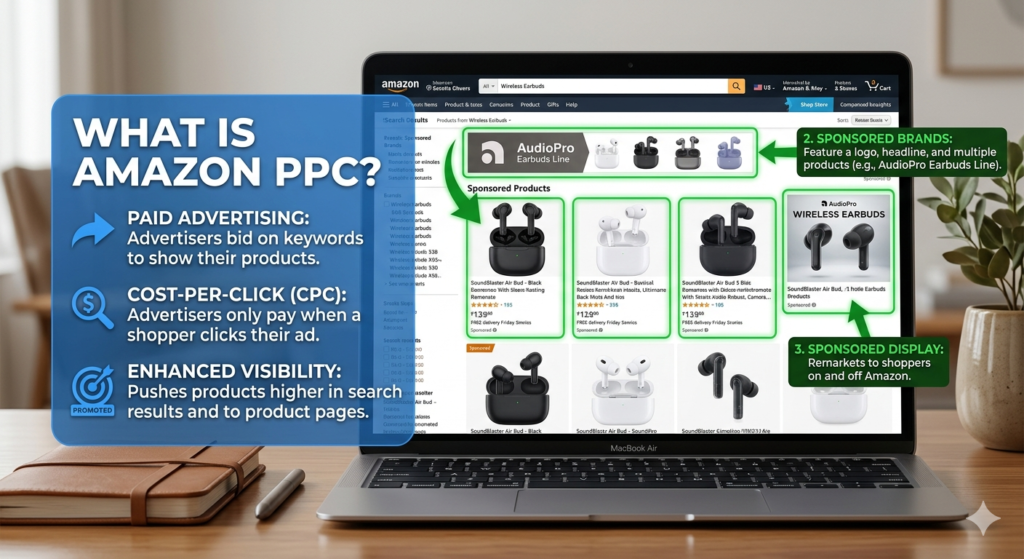
Amazon PPC stands for Pay-Per-Click advertising. It’s a system where sellers bid on keywords to display their product ads on Amazon. The key rule? You only pay when someone actually clicks on your ad.
Think of it like this: you’re paying for qualified visitors to your product page, not just for people to see your ad.
How Amazon PPC Works in the UAE Market
When a shopper types “wireless headphones Dubai” into Amazon.ae, Amazon runs an auction. Sellers who have bid on related keywords compete for ad placements. The ads that win appear at the top of search results or on product pages.
Here’s the important part: The UAE marketplace is unique. While it’s smaller than the US or Europe, it has lower competition and lower CPC (Cost-Per-Click) in many categories. This means you can often get better returns on your ad spend compared to more saturated markets. The key is finding the right product-market fit and executing a tailored PPC strategy.
Why Should You Care? The Strategic Importance of PPC
Let’s be honest – Amazon PPC isn’t just about “getting traffic.” It does three critical things for your business:
- Boosts Organic Ranking: Amazon’s A9 algorithm loves sales velocity – products that sell faster rank higher organically. PPC drives initial sales, which tells Amazon your product is worth showing. The result? Better organic visibility even when you’re not running ads.
- Provides Data Goldmine: Every click and conversion gives you data. You’ll discover exactly which keywords shoppers use to find and buy your product – insights you can use to optimize your entire listing.
- Generates Initial Visibility: For new products with zero reviews, PPC is often the only way to get noticed in a crowded marketplace.
Tip: Before you spend a single dirham on PPC, make sure your product listing is fully optimized. A poorly listed product will waste ad spend, no matter how well-targeted your campaigns are. High-quality images, clear benefits, and competitive pricing are non-negotiable.
How Amazon PPC Works: The Auction System Demystified
The Amazon ad auction isn’t just about who bids the most money. It’s about relevance + bid + conversion history.
The Ad Auction Formula
Your Ad Rank determines whether your ad shows and where it appears. Amazon calculates it using:
- Your Bid Amount: How much you’re willing to pay per click
- Relevance: How well your keywords match your product listing
- Conversion History: How well your product converts clicks into sales
Key takeaway: A high bid alone won’t win you top placement. If your listing doesn’t convert well or your keywords aren’t relevant, you’ll lose to a competitor with a lower bid but better performance.
The Anatomy of a Campaign
Understanding the campaign structure is essential for success:
- Campaign: The top-level container. You set a daily budget here.
- Ad Group: Within each campaign, you group similar keywords and products together.
- Keywords: The specific search terms that trigger your ads.
- Products: The items you’re advertising.
Good campaign structure makes optimization easier. For beginners, keeping it simple is smart – one campaign, one ad group, and a focused list of keywords.
The Three Types of Amazon Ads (And Which One to Start With)
Amazon offers three main ad formats. Here’s when to use each one.
Sponsored Products (The Best Place to Start)
What they are: Keyword-targeted ads that promote a single product in search results and on product detail pages.
Why start here:
- Simplest to set up – just pick products and keywords
- Reaches high-intent shoppers ready to buy
- Provides the clearest data (search term reports)
For beginners, Sponsored Products should be your first ad format. They give you the most control and learning data.
Sponsored Brands
What they are: Banner-style ads featuring your brand logo, a headline, and up to three products. They appear at the top of search results.
When to use: After you’ve got Sponsored Products working. They’re great for building brand awareness and showcasing a product range. You’ll need to be Brand Registered to use them.
Sponsored Display
What they are: Ads that use audience and product targeting to reach shoppers both on and off Amazon.
When to use: Retargeting shoppers who viewed your product but didn’t buy, or defending your detail pages from competitors. Use these after you’ve mastered the basics.
Setting Up Your First Amazon PPC Campaign (Step-by-Step)
Prerequisites: The “Before You Start” Checklist
Don’t launch a campaign until you’ve checked these boxes:
- High-Quality Listing: Clear images, optimized title, bullet points that sell, and A+ Content (if available)
- Competitive Pricing: Check your competitors on Amazon.ae – are you in the right range?
- Some Reviews (5+): Products with 5+ reviews convert significantly better. Use Amazon’s Vine Program or Request a Review button to get initial feedback
- Adequate Inventory: If you run out of stock, Amazon will stop showing your ads
- Buy Box Ownership: You can’t effectively advertise if you aren’t winning the Buy Box
Tip: Before spending on PPC, ensure your product is fully optimized and your seller account is ready. A poorly listed product will waste ad spend, no matter how well-targeted your campaigns are.
Step 1: Navigate to Seller Central
Go to Amazon Seller Central. Under the “Advertising” tab, click “Campaign Manager” to get started.
Step 2: Choose Your Campaign Type & Goal
For your first campaign, choose Sponsored Products. Start with one automatic campaign and one manual campaign. Use the automatic campaign to discover which keywords Amazon thinks are relevant, then use the manual campaign to control your spending on the best-performing terms.
Step 3: Set Your Budget and Bidding Strategy
- Daily Budget: Start with AED 35–110 per month ($10–$30/day). For less competitive categories, stay on the lower end. For a new product launch, budget $1,500–$3,000 per month for 60–90 days is recommended .
- Bidding Strategy: For new campaigns, use “Dynamic bids – down only.” This lets Amazon lower your bid when a conversion is unlikely, saving you money.
Tip: Start low and adjust. If your ad isn’t getting impressions, gradually raise your bid. If it’s spending too fast without sales, lower it.
Step 4: Keyword Targeting
Understand your match types:
- Broad Match: Your ad triggers for variations of your keyword. Highest reach, but also the riskiest for wasted spend
- Phrase Match: Your ad triggers when the search includes your exact phrase in order. Good balance of reach and control
- Exact Match: Your ad triggers only for that exact search term. Most targeted and efficient
For beginners, use broad and phrase match types early, then refine with exact match and negative keywords as data accumulates.
Step 5: Launch and Monitor
Your first week is for data collection, not panic. Watch what happens, download your search term report after a few days, and start planning your first optimization round.
Understanding Amazon PPC Costs & Metrics: The Money Talk
What is ACoS? (Advertising Cost of Sales)
ACoS is your primary efficiency metric. It tells you how much you’re spending on ads to generate one dirham of attributed sales.
Formula: ACoS = (Ad Spend / Ad Sales) × 100
If you spend AED 100 on ads and generate AED 500 in sales, your ACoS is 20%. You spent AED 0.20 on advertising for every dirham of revenue those ads generated.
What is a “Good” ACoS?
There’s no universal number. A good ACoS depends entirely on your product category, profit margins, and business stage . For context:
| Category | Top 25% (Best) | Typical | Bottom 25% |
| Electronics | 10% | 16% | 25% |
| Beauty & Personal Care | 18% | 29% | 50% |
| Home & Kitchen | 18% | 25% | 35% |
| Sports & Outdoors | 12% | 22% | 34% |
| Toys & Games | 11% | 16% | 26% |
Source: Amazon Brand Metric reports
During launches, expect a higher ACoS (30-40%) while you build data and momentum.
Your Break-Even ACoS: The Number You MUST Calculate
Before you set any targets, you need to calculate your Break-Even ACoS. This is the maximum ACoS you can have before you start losing money on a sale.
Formula: Break-even ACoS = (Unit Margin / Selling Price) × 100
Example:
- Your product sells for AED 100
- After product costs and Amazon fees, your unit margin is AED 35
- Break-even ACoS = (35 / 100) × 100 = 35%
Any ACoS below 35% makes you money. Any ACoS above 35% loses money on each sale. This is the single most important number for your PPC profitability.
What is TACoS? (Total Advertising Cost of Sales)
While ACoS measures ad efficiency, TACoS measures how advertising fits into your total business health.
Formula: TACoS = (Ad Spend / Total Revenue) × 100
ACoS only looks at sales directly attributed to ads. TACoS includes ALL revenue (organic and ad-attributed), giving you a complete picture. TACoS shows the organic lift your advertising creates – as you improve your product’s relevance through advertising, you climb in organic rankings, reducing your TACoS.
ACoS is for campaign-level optimization. TACoS is for business-level strategy.
Benchmark Ranges for UAE Sellers
- Good (established products): 15-20% ACoS
- Category average: Varies widely (see table above)
- New product launches: 30-40% ACoS (acceptable during learning phase)
- UAE marketplace advantage: Lower competition in many categories can mean lower CPC, helping you achieve stronger results
How to Optimize Your Campaigns and Stop Wasting Money
Use Negative Keywords (The Money-Saver)
This is the #1 way to stop wasting budget. Negative keywords prevent your ad from showing on irrelevant searches.
How to use them:
- Download your Search Term Report after 3-7 days
- Look for search terms that ate your budget with zero conversions
- Add them as “Negative Keywords” immediately
20-40% of ad budget is often wasted on irrelevant clicks. Negative keywords plug those leaks.
Leverage the Search Term Report (The Data Goldmine)
This report is where you find your winning keywords.
Actionable Step:
- Identify search terms with high clicks AND high conversions
- Add these as “Exact Match” keywords in a new, dedicated campaign
- This is how you scale – moving winners into controlled, high-efficiency campaigns
The Optimization Routine
PPC isn’t “set and forget.” During the first two weeks, check your campaigns every 2-3 days. Once stable, weekly is fine. Always add winners, block the waste, and tune bids in small steps.
Tip: Track your Conversion Rate – aim for around 9.5% which is average for Amazon . If your conversion rate is below this, fix your listing before increasing ad spend.
Common Amazon PPC Mistakes to Avoid
- Running PPC on a “Bad Listing” – No reviews, poor images, weak copy. Fix the listing first or you’re burning money.
- Setting It and Forgetting It – PPC requires constant care and weekly optimization.
- Not Using Negative Keywords – You’re literally giving money away to irrelevant searches.
- Overspending on Broad Match – Broad match is for discovery, not for long-term profitability.
- Not Understanding Your Break-Even ACoS – If you don’t know this number, you don’t know if you’re profitable.
When Should You Hire a Professional for Amazon PPC?
Signs you need help:
- You lack the time to manage campaigns properly
- Your ACoS is consistently above your break-even point
- You’re not scaling despite increasing budget
- You feel overwhelmed by the data
This is where Trufijo comes in. Trufijo empowers businesses like yours by providing dedicated, trained virtual assistants who handle the entire sales outreach system – lead generation, customer support, and even PPC management – so you can focus on strategy and growth.
Trufijo’s Value Proposition: With Trufijo, you leverage “The Future of Work” – scalable, borderless sales systems. Their team of trained professionals acts as your specialized support, handling the complex daily management of your sales pipeline. You can focus on your product and closing deals while a dedicated team, backed by strong security and reporting, drives your growth.
Ready to build a system that drives your sales? Schedule a consultation with Trufijo today.
Frequently Asked Questions
Is Amazon PPC worth it for beginners?
Yes, but only if you start with a small budget, target keywords carefully, and have a high-quality listing. It’s an investment to gain initial visibility and data. In competitive categories, PPC is not optional – it’s how you get noticed.
What is a good ACoS for a new product?
For a new product, you might aim for 30-40% to gain traction. The goal is to reduce this over time as your organic rank improves. For mature SKUs, set an ACoS target that protects your profit margin and stick to it. Category averages range from 10% (electronics) to 35% (home & kitchen) .
How much does Amazon PPC cost?
The cost varies dramatically by category. In 2025, the average CPC is around $0.98 across all categories, ranging from $0.20 to $3.00+ depending on competition . High-competition categories can push $1.50-$3.00 per click, while low-competition categories average $0.30-$0.75 . You set your own daily budget.
What is the difference between Automatic and Manual campaigns?
Automatic campaigns let Amazon choose the keywords for you. Manual campaigns allow you to select specific keywords and match types. Automatic is great for research; Manual is best for targeted control.
How often should I optimize?
During the first two weeks, check your campaigns every 2-3 days. Once stable, weekly is fine. Always add winners to exact match, block waste with negative keywords, and tune bids in small steps .
Can I run Amazon PPC myself?
Absolutely. This guide provides the basics for a DIY approach. However, as you scale, it can become very time-consuming. Many successful sellers partner with experts like Trufijo to manage the system for them, freeing up time for product development and business strategy.
Conclusion & Your Next Steps
Amazon PPC is a powerful tool, but it’s not magic. It’s a system that requires understanding, strategy, and consistent management. The key is to start smart, watch your metrics like a hawk, and optimize relentlessly.
Here’s your action plan:
- Optimize your listing before spending a dirham on ads
- Calculate your break-even ACoS – this is your profitability guardrail
- Launch two campaigns: one automatic (for discovery) and one manual (for control)
- Set a small daily budget (AED 35-110) to start learning
- Download your search term report after 3 days – add winners to exact match, block losers with negative keywords
- Repeat this process weekly
Your journey starts now. You have the knowledge. Execute on it, or, let Trufijo handle it all for you. Start with a small, learning-focused campaign, and as you see results, consider bringing in the experts to scale your success.
Ready to stop guessing and start growing? Trufijo’s top 1% hand-picked virtual assistants can power your Amazon business – from PPC management to full sales execution. Schedule your free consultation today.
